
|
Contents
Trade Ideas Review for 2025Trade Ideas has really built a name for itself in the financial world, especially for the traders who want the smartest tools for stock analysis. Why is it popular with them? Because it’s full of features and they include AI-driven tools and automation, and that means that it’s designed to help day traders, swing traders, and active investors stay as sharp as they need to be in today’s market! Our complete review will cover everything that Trade Ideas can do for traders in 2025. From its tools to its pricing, we’ll unpack whether it’s the right fit for your trading style and if it’ll work for you! Trade Ideas is a platform that’s designed to help traders identify possible opportunities in the stock market. It was launched in 2003 by a team of financial technology entrepreneurs, and the platform has grown over the years to incorporate more advanced tools and features that are customized for active traders. Since its inception, Trade Ideas has been at the forefront of integrating all kinds of new technology into trading. The platform was built from the ground up, and it relies on real-time data analysis to highlight stocks with the potential for significant gains. It also introduced features like AI-powered trading signals and real-time stock races, which improve its offerings so that it can meet the evolving needs of traders. |

|
Target Audience of Trade Ideas
What kind of finance bros (or women) does Trade Ideas cater to? The following:
- Day Traders: Those who buy and sell securities within the same trading day and are looking to capitalize on any short-term market movements.
- Swing Traders: Traders who hold positions for several days to weeks and want to profit from expected upward or downward market shifts.
- Active Investors: Investors who regularly engage in buying and selling activities to exploit any market opportunities.
The above groups benefit from Trade Ideas’ real-time data analysis, AI-generated trade suggestions, and customizable scanning tools—all are designed to give them a competitive edge in the trading world.
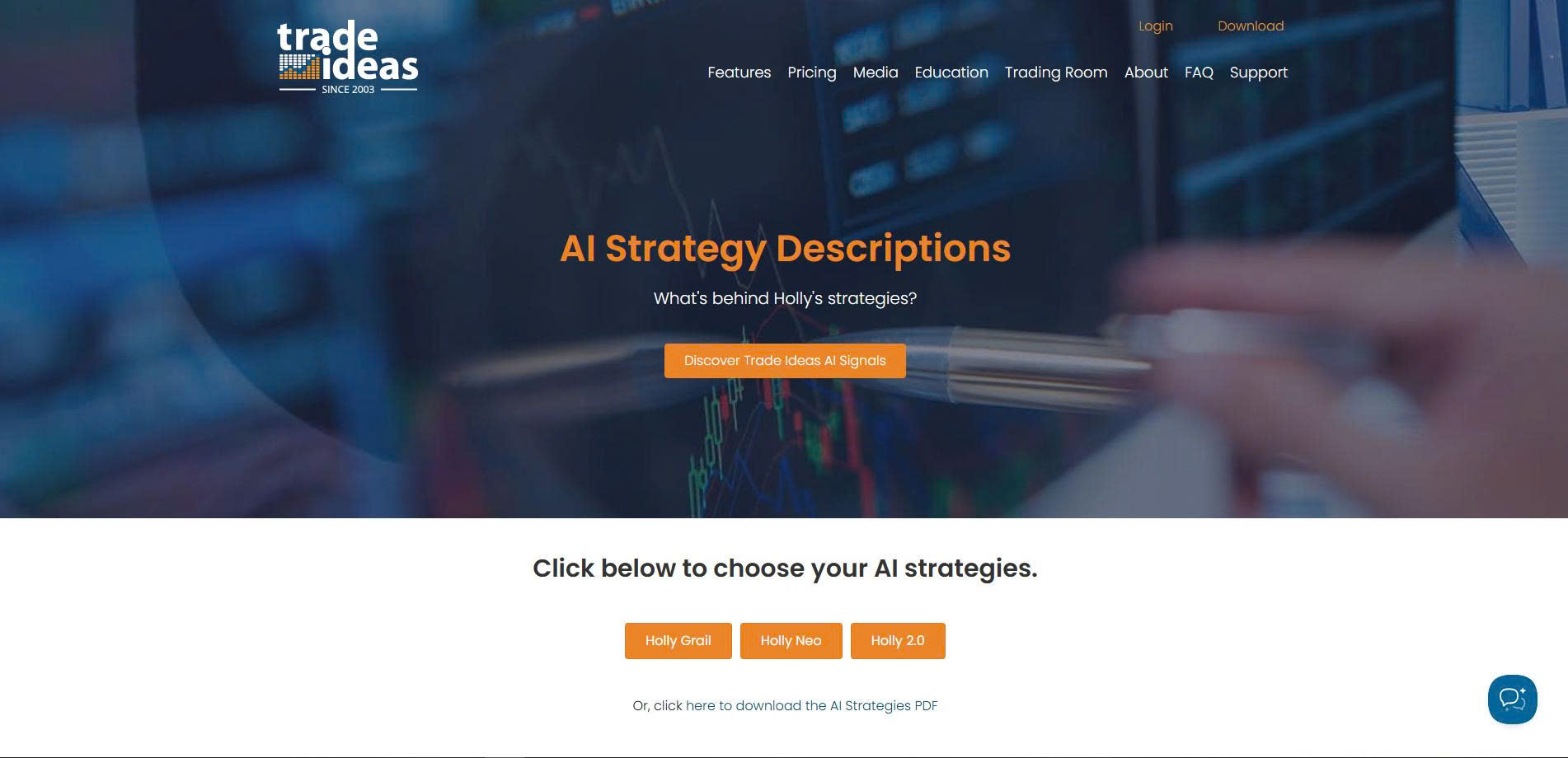
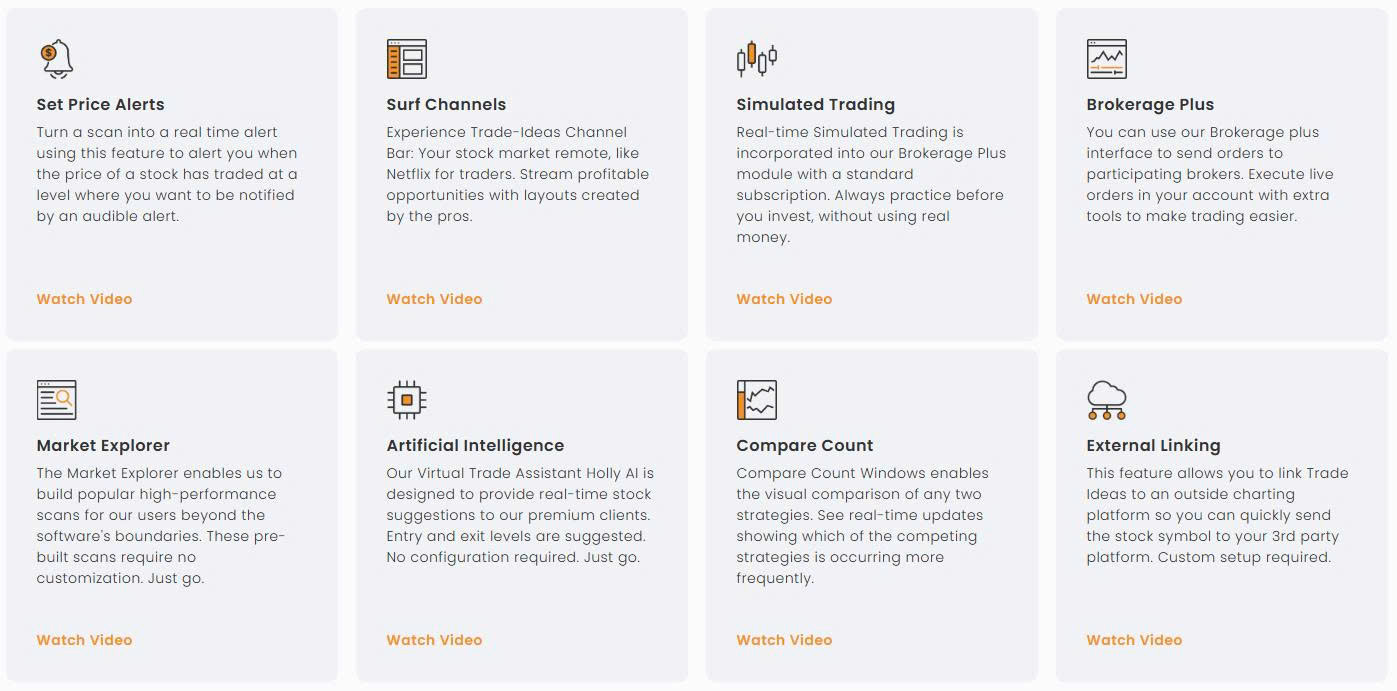
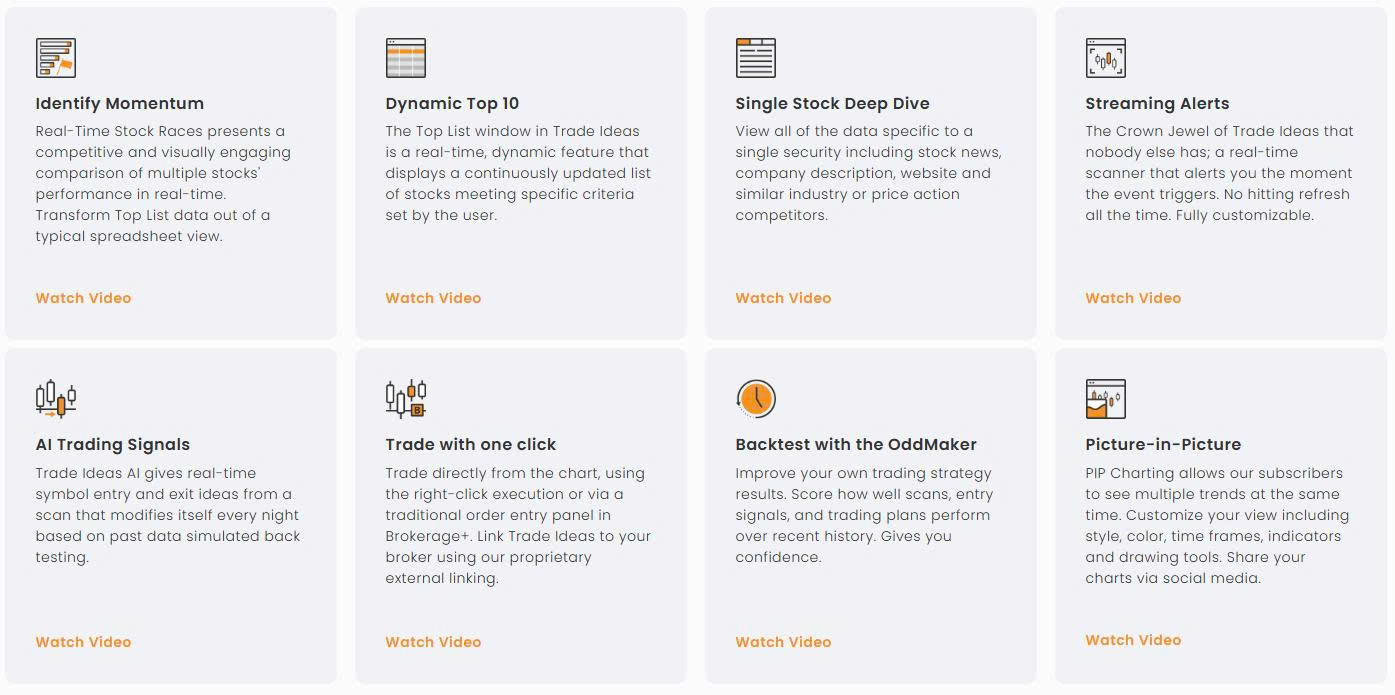
Key Features and ToolsDon’t mistake Trade Ideas for just a stock scanner—it’s a total toolkit that’s built to help traders make smarter, faster, and the most confident decisions. From AI-powered insights to hands-on learning tools, below is a look at what it has to offer in 2025! AI-Powered Trading with HollyHolly is like having an experienced trading partner at your side, as it (she?) processes mountains of data to highlight any opportunities that traders might otherwise miss. But Holly doesn’t stop at spotting potential trades; it goes beyond even further by testing the ideas against historical performance and analyzing risks. In 2025, Holly got some upgrades that have made it sharper and more effective—it now processes data faster and refines trade recommendations in real-time, which is super handy during volatile markets. There’s also been a concentration on honing its ability to identify momentum plays and reversals, which are really important for traders who want to stay ahead of the curve. |
What We Like Most at Trade Ideas |
Real-Time Stock Scanners
The stock scanners in Trade Ideas are a fav, and for good reason. They let you search the market based on filters that match up with your specific strategy. Want to find low-float stocks with high volume or spot a breakout before it happens? The scanner tools make that easy.
A new feature that was added is a more interactive interface that helps traders visualize their scans better, which makes it easier to spot trends or identify the right stock at a glance. If you’re scanning for opportunities during the quieter morning hours or tracking fast-moving plays during a busy trading session, the scanners give you quick and precise results.
|
|
Charting and Technical AnalysisFor those traders who rely heavily on charts, Trade Ideas has the tools that eliminate the need for any kind of third-party software. You can analyze everything from volume spikes to trendlines directly on the platform. It’s simple enough for someone learning technical analysis, yet still has enough detail so experienced users can delve into the minutiae of a trade setup. The built-in pattern recognition feature is especially helpful, as it automatically identifies setups like double bottoms or ascending triangles. It’s basically like having another extra pair of eyes to confirm what you’re seeing—or what you could overlook. |

Simulated Trading
The paper trading feature on Trade Ideas is an exceptional tool for practice and strategy testing. It’s not a basic demo; it exactly mimics real market conditions, and that gives you a realistic feel for how trades would play out without putting any money at risk.
If you’re experimenting with a new trading style or honing an existing approach, this is a really safe space to learn and get better. You can test everything from intraday scalps to swing trades while tracking your progress. It’s perfect for traders who want to build up their confidence before getting into live markets!
Strategy BacktestingIf you have wondered if a trading idea would’ve worked last week, last month, or even last year, then wonder no more! Meet the OddsMaker, a backtesting tool that lets you run your strategies against historical data to see how they’d perform. The updates in 2025 have made the process even smoother—there is a simplified interface that’s accessible to traders who don’t have a tech background. If you’re playing with your stop-loss levels or trying out a new entry signal, OddsMaker helps you optimize your plan before you take it live. |
|

Broker Integration
Trading directly from the platform is child’s play, and it’s all thanks to its broker integrations. Interactive Brokers is one of the biggest names that is supported, and the connection means that you are able to execute trades seamlessly while keeping it all under one convenient roof.
This year, Trade Ideas expanded its brokerage compatibility, and that makes the platform more versatile for traders who are using other services. It cuts back on unnecessary steps so that you can concentrate on what matters—trading.
Educational Resources
For anyone who feels overwhelmed by the sheer number of tools and features, Trade Ideas has solid educational resources! It hosts daily webinars that are led by professional traders, has easy-to-follow tutorials, and even offers one-on-one training for those who need more personalized guidance.
Beyond the official resources, there’s also a community of users who swap tips, strategies, and support. It doesn’t matter if you’re a beginner or an experienced trader who is trying to sharpen your skills—there’s so much here to help you get up to speed and get better!
Mobile and Web Accessibility
Okay, so the desktop platform is where Trade Ideas really does its best, but they have been working on making the experience more accessible on the go. The web-based version makes sure that you are able to check in on your trades from anywhere, and there is a mobile app, but it’s still in the works.
The improvements in 2025 have focused on speeding up the app’s performance and adding new features, and all of that combined makes it a handy companion for traders who need flexibility in how they access their tools.
Trade Ideas’ Pricing Plans
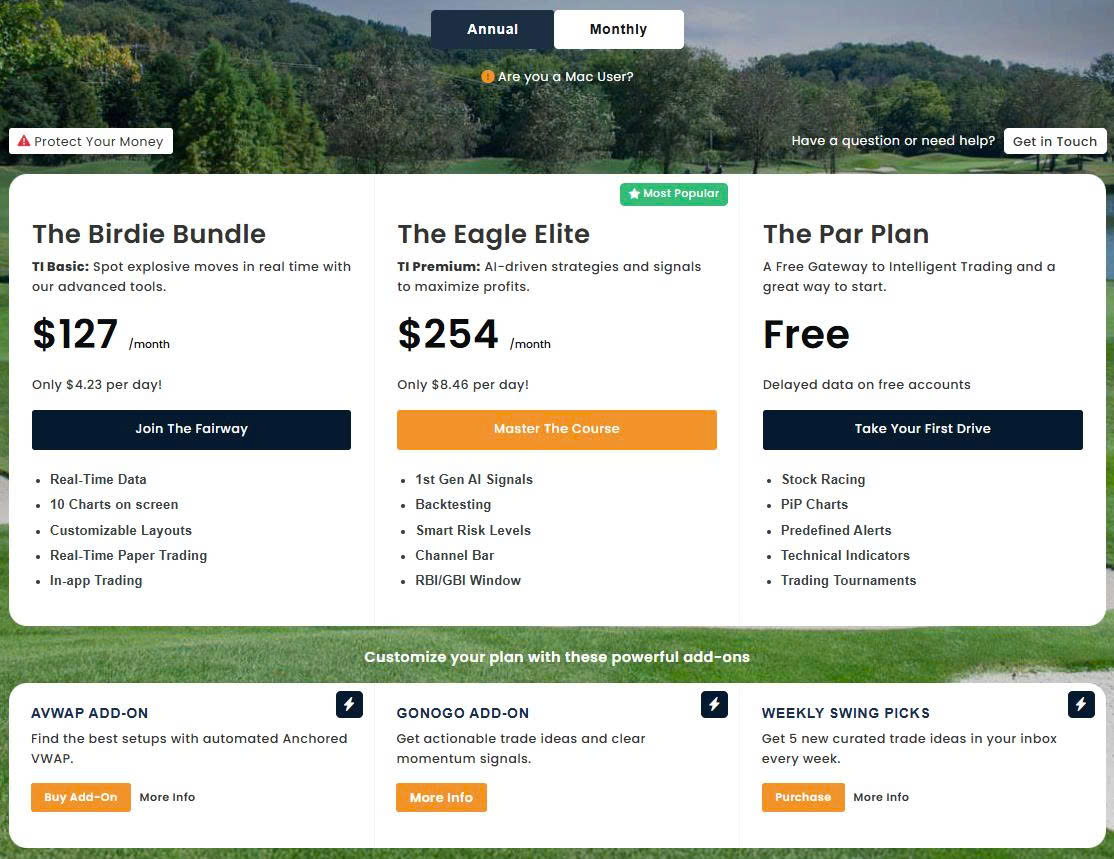
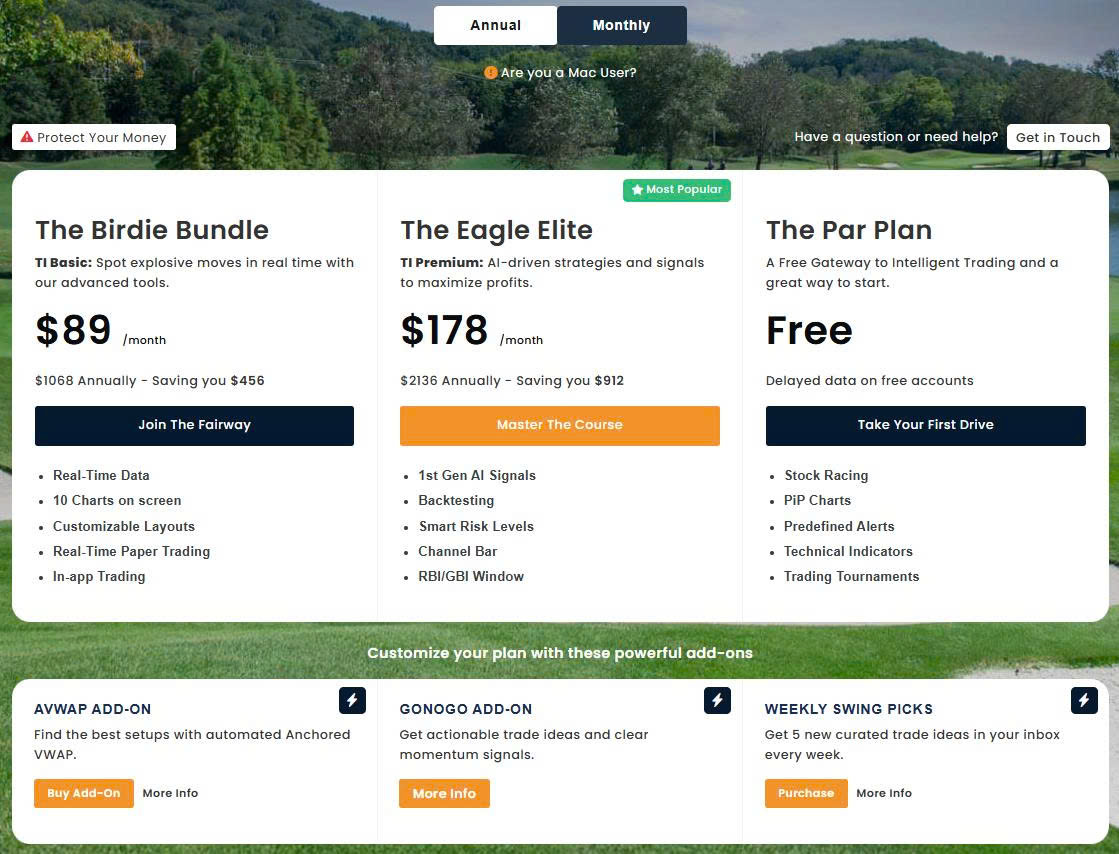
Trade Ideas has several subscription plans that are available, and all are tailored to different trading needs and budgets. The following is a detailed breakdown of their offerings as of our review:
Free Plan: Free Flow
If you’re looking for a detailed breakdown of commission rates and other pricing at Firstrade, you’re in the right place. Learn about the credit interest rates and margin rates the platform carries and the regular pricing on instruments like options, mutual funds, stocks, and ETFs.
Cost: Free
Features:
- Delayed market data
- Access to Stock Racing
- Picture-in-Picture (PiP) Charts
- Predefined alerts
- Technical indicators
- Participation in trading tournaments
This plan is the best one for beginners who want to explore the platform without any financial commitment. But the delayed data could limit its effectiveness for active trading.
Standard Plan: Paddle In
Monthly Subscription: $127
Annual Subscription: $1,068 ($89 per month)
Features:
- Real-time market data
- Up to 10 charts on screen
- Customizable layouts
- Real-time paper trading
- In-app trading capabilities
This plan is perfect for traders who need real-time data and basic trading tools but don’t necessarily want or need the advanced AI features.
Premium Plan: Momentum Master
Monthly Subscription: $254
Annual Subscription: $2,136 ($178 per month)
Features:
- All Standard Plan features
- Access to both first and second-generation AI signals
- Strategy backtesting tools
- Smart risk levels
- Channel bar with curated trading templates
This plan is designed for traders who want comprehensive tools, and that includes AI-driven strategies and advanced analytics.
Extras/Add-Ons
Trade Ideas also offers additional features that can be integrated into any plan:
- Anchored Volume Weighted Average Price (AVWAP) Add-On: Automates the Anchored VWAP to help identify optimal entry and exit points.
- GoNoGo Add-On: Provides actionable trade ideas and clear momentum signals.
- Swing Pick Add-On: Delivers five new curated trade ideas to your inbox every week.
The above extras and add-ons give traders the ability to customize their experience even further based on specific trading strategies!
Billing and Cancellation Policy
All subscriptions are recurring, but there are no long-term contracts. Customers can cancel at any time via the Account Management portal. All sales are final, but Trade Ideas does give store credit or exchanges. They accept payments via credit card and PayPal, and there are options for Western Union, wire transfers, or personal checks (but only in certain situations).
Trade Ideas Coupon Code and Promos
Occasionally, Trade Ideas will throw traders a promotional code that offers discounts on an initial subscription period. As of this review, you can use the promo code “STOCKAPP15” to reduce the monthly Premium Plan price from $254 to $215.90 and the annual price from $2,136 to $1,815.60. You should always check for any current promotions that are out there before you subscribe!
When you are trying to decide between the Standard and Premium plans, it all depends on what you need as a trader and how you go at the market.
Who Benefits Most from the Standard Plan?
The Standard plan ($127/month or $89/month annually) is geared toward the traders who are more hands-on and don’t feel like they need any AI-guided strategies. With features like real-time stock scanners, paper trading, and customizable layouts, it has the essential tools for finding opportunities and refining your trading style.
For beginners or part-time traders, this plan gives them a solid foundation without the extra cost of features that they won’t use—at least not at the beginning of their trading. But it does lack advanced tools like Holly, strategy backtesting, and premium channels, which are all really valuable for traders who want to elevate their trading.
What Makes the Premium Plan Stand Out?
The Premium plan ($254/month or $178/month annually) has everything that’s in the Standard plan but includes access to more advanced tools like the following:
- Holly AI: Holly’s ability to generate trade ideas, backtest strategies, and suggest risk levels is an amazing asset for traders who want more data-driven insights.
- OddsMaker Backtesting: The tool gives you the power to test your strategies against historical data before executing them in live markets, and that helps you polish your approach with even more precision.
- Smart Risk Management: The AI doesn’t only suggest trades—it provides context, offering guidance on stop-loss placement and profit targets, and that cuts back on the guesswork.
- Exclusive Channels: The curated trading channels are so great for those who want pre-defined templates that are based on specific strategies, so it’s easier to jump into the action.
The Premium plan is probably the best choice for experienced traders, those managing larger accounts, or anyone who wants to decrease any manual effort by leveraging AI-powered tools. It’s a solid choice for full-time professionals and traders who are looking to maximize productivity.
Is the Premium Plan Worth It?
Yes, but only if you plan on fully utilizing all of its advanced features. The Premium plan is the best for traders who do the following:
- Regularly trade in fast-moving markets and need real-time AI insights.
- Want the ability to test and adapt their strategies through backtesting.
- Want guided, pre-built templates and strategies for quicker decision-making.
If you’re a beginner or usually only trade as a hobby, the Premium plan will probably feel like overkill. But if you’re a serious trader and you want to sharpen your edge? The additional tools will justify the higher cost by possibly improving your trade performance and risk management!
Pros and Cons of Trade Ideas
Trade Ideas does indeed deliver a comprehensive toolkit for active traders, but it’s not without a few drawbacks. Below, we take a fair and balanced look at both!
Pros
Trade Ideas has a lot of advantages, which is why it’s already a go-to choice for active traders. The following are the reasons why it’s worth it:
- Advanced AI-Powered Analysis: Trade Ideas uses sophisticated artificial intelligence to scan and analyze market data so that traders get actionable insights and possible opportunities that might be missed through a manual analysis.
- Real-Time Data Streaming: The platform has continuous, real-time streaming of market alerts, which guarantees that traders have accurate and up-to-the-minute info so that they are able to make informed decisions—fast.
- Customizable Scanning Tools: With highly customizable scanning features, traders can tailor the platform to their specific strategies and filter stocks based on different criteria so that they can identify setups that match up with their trading plans.
- Comprehensive Educational Resources: Trade Ideas has extensive educational content, which includes webinars, tutorials, and a supportive community. All of this helps traders to improve their knowledge and effectively utilize all of the platform’s various features.
Cons
Now that we’ve established its benefits, Trade Ideas does have its limitations. Below are some of the aspects that might not work for every trader:
- High Subscription Costs: The platform’s subscription fees are pretty pricey compared to some of its competitors, and that could be a big barrier for traders who have limited budgets.
- Steep Learning Curve: Even though we love its extensive features and advanced tools, new users will probably see the platform as too complex, and it’ll require a pretty big time investment if they want to become proficient.
- Limited Asset Coverage: Trade Ideas primarily focuses on U.S. stocks and ETFs, so there is limited support for other asset classes like forex or cryptocurrencies, and that shuts out the needs of those traders who are interested in diverse markets.
- No Native Mobile Application: As of now, Trade Ideas does not have a dedicated mobile app, and that limits accessibility for traders who want or need mobile trading capabilities.
.jpg)
Who is Trade Ideas Best For?
Trade Ideas isn’t designed for every trader out there—it excels in specific use cases. We want to pinpoint exactly who will benefit most from what the platform has to offer, so read on to find out!
Ideal Audience
- Day Traders: Those who need to react quickly to intraday price movements will like the platform’s real-time scanning, customizable filters, and AI insights.
- Swing Traders: For those holding positions for a few days to weeks, tools like backtesting and simulated trading will help refine their entry and exit strategies.
- Active Investors: Investors who make frequent trades will find a lot of value in features like automated alerts and integration with brokers for seamless trade execution.
Beginners vs. Advanced Traders
- Beginners: While the platform does have a pretty steep learning curve, Trade Ideas gives users plenty of tutorials, webinars, and paper trading tools to help new traders get oriented. But we will say this as a warning: the advanced features will look and feel intimidating at first glance.
- Advanced Traders: Experienced users will love the AI tools, customizable scanners, and detailed analytics that support data-driven decisions. The Premium plan, in particular, is best for those who actively trade and need more sophisticated strategies.
Where Trade Ideas Stands Out
Trade Ideas performs exceptionally well in scenarios like the following:
- Intraday Momentum Trading: The platform excels at spotting breakouts and reversals in real-time, and that gives day traders a nice competitive edge.
- Strategy Development: For traders who want to polish their approach, the backtesting and AI tools are great at giving really valuable insights.
Comparison to Other Platforms
Trade Ideas is in heated competition with lots of other trading platforms, and all have their own unique set of tools and features. Let’s take a look at how it compares to three of its current trading platform peers!
Trade Ideas vs. TrendSpider
- Strengths of Trade Ideas: The best feature here, hands down, is the AI assistant, Holly, as it gives real-time trade suggestions and risk management. Also, Trade Ideas includes paper trading and advanced backtesting, which TrendSpider doesn’t begin to match in depth.
- Strengths of TrendSpider: TrendSpider excels in its charting tools and automation for a more technical analysis. It’s a solid choice for traders who want automated trendline detection and heatmaps but don’t necessarily need AI-driven trade ideas.
- Best For: Choose Trade Ideas for active, strategy-driven trading and TrendSpider for visual, chart-heavy analysis.
Trade Ideas vs. Finviz Elite
- Strengths of Trade Ideas: Trade Ideas has AI-powered insights and in-depth customization for stock screening, which Finviz Elite doesn’t have. The platform also incorporates broker integration for direct trading, which only adds to its usability.
- Strengths of Finviz Elite: Finviz Elite is definitely a more budget-friendly option, and it has strong filtering tools for finding stocks based on fundamentals and technicals. But it lacks the strong AI and backtesting features of Trade Ideas.
- Best For: Go with Trade Ideas if AI and automation are priorities, but Finviz Elite is a good pick for traders who are focused on affordability and basic screening tools.
Trade Ideas vs. TC2000
- Strengths of Trade Ideas: As we have said ad nauseam, the platform shines brightly due to its AI assistant, real-time stock races, and advanced backtesting. It also integrates seamlessly with brokers, which facilitates direct trading.
- Strengths of TC2000: TC2000 has excellent charting tools and is highly customizable for traders who prioritize visuals and ease of use. It also supports forex and options, and Trade Ideas does not.
- Best For: Pick Trade Ideas for stock scanning and AI-driven strategies, but TC2000 is better for traders who need multi-asset coverage and advanced charting.
Where Trade Ideas Stands Out Overall
- AI-Powered Tools: Holly sets Trade Ideas apart by providing actionable insights and strategy testing.
- Real-Time Scanning: Its customizable scanners and live alerts make it a top choice for day traders.
- Education and Support: With tutorials, webinars, and a supportive community, it’s accessible to both new and experienced traders.
Where It May Fall Short
- Cost: Trade Ideas is pretty expensive, especially compared to alternatives like Finviz Elite.
- Asset Coverage: The platform is primarily focused on U.S. equities and lacks any support for other markets like crypto or forex.
How to Get Started with Trade Ideas
Getting started with Trade Ideas is a pretty easy process, and the platform has plenty of tools to help you get up and running! Below is a step-by-step guide on how to sign up and start trading:
Sign-Up Process
- Visit the official Trade Ideas website and click on the “Pricing” tab.
- Choose a plan that suits your needs—Free, Standard, or Premium.
- Create an account by entering your email, choosing a password, and completing the payment details.
- (Optional) Apply any promo codes during checkout to lower your subscription cost.
- Log in to your new account and start exploring the platform. Trade Ideas also offers a free trial for those who want to test the waters before committing to a plan.
Customizing Scans
- Once you have created your account and logged in, navigate to the scanning tools so that you can create custom filters that are based on your trading style.
- Adjust settings like price range, volume, and technical indicators to pinpoint stocks that fit in with your strategy.
- Save your scans for easy access during trading hours.
Simulated Trading
- Open the paper trading feature to practice your trades in a risk-free environment.
- Test different strategies or any of your setups using real-time market data.
- Track your performance to see how your ideas will perform without the pressure of risking any real money.
Accessing Educational Resources
- Trade Ideas has an extensive library of webinars, tutorials, and training sessions to help you get familiar with the platform.
- You can schedule one-on-one training sessions if you want more personalized guidance.
- Join the Trade Ideas community forums to exchange tips and strategies with other users.
Bonus Tips for Getting Started
- Start with predefined channels and templates to get a good feel for how the platform works.
- Use the AI assistant, Holly, to see trade suggestions in action while you are learning how to analyze market data effectively.
- Experiment with smaller adjustments to filters and settings so that you can personalize the experience as you get your trading legs under you!
Final Verdict: Is Trade Ideas Worth It?
As far as we are concerned, Trade Ideas is at the front of the pack in 2025. It’s a super capable platform for all active traders, so if you want to hone your approach or get a more competitive edge, it has all of the tools that will appeal to all kinds of users!
If you’re serious about trading and think that you are ready to invest in a platform that has top-tier AI trading tools, Trade Ideas is absolutely worth considering. The Premium plan, in particular, is geared toward traders who do their best trading with real-time data and strategy testing. And for the beginners and casual traders out there? Trade Ideas’ Standard plan has what you’ll need to get going!
Frequently Asked Questions About Trade Ideas
Have more questions about the Trade Ideas platform? Below are some common and most frequently asked questions that our readers have sent us!
Does Trade Ideas support non-stock markets like crypto or forex?
Unfortunately, it doesn’t—Trade Ideas is focused on U.S. equities and ETFs. If you’re trading forex, crypto, or other markets, you’ll have to look for other platforms that specialize in those areas, like TradingView or ThinkorSwim.
How accurate are Holly’s AI-generated trade ideas?
Pretty accurate! Holly’s trade ideas are all based on extensive backtesting and real-time market data. And while the suggestions are really data-driven, there isn’t a system that exists that can guarantee trading success. Holly works best when it’s combined with a trader’s own analysis and risk management strategies.
Is the simulated trading feature realistic?
It is! The simulated trading environment closely mimics live market conditions, and that means that you can practice strategies without risking any actual money. It’s an excellent tool for increasing confidence and bettering your approach.
Can I trade directly from Trade Ideas?
Yup! Trade Ideas integrates with brokers like Interactive Brokers and E*TRADE so that you can place trades right through the platform. It simplifies the process and eliminates the need to juggle multiple apps or switch between platforms.
What’s the main difference between Standard and Premium plans?
The Standard plan has real-time scanning and basic trading tools, but the Premium plan adds more advanced features like Holly AI, strategy backtesting, and curated trading channels. The Premium plan is the best for more experienced traders or those who want automation and enhanced strategy testing.
Is there a free trial for Trade Ideas?
There is! Trade Ideas has a free trial period for new users, and it lets you explore the platform’s features without committing to a subscription, but only for a limited time period. Check their website for current trial offers or promotional discounts.
Does Trade Ideas work on mobile?
Trade Ideas has a web-based version that can be accessed on mobile devices, but there is no dedicated mobile app…yet. The web version is functional for quick checks, but the platform does perform best on a desktop for full access to its tools.
Are there any hidden fees or extra costs?
The subscription fees cover most features, but there are some optional add-ons, like the Anchored VWAP tool, that come at an extra cost. Make sure you do a careful review of all the pricing details before signing up!
How much time does it take to learn Trade Ideas?
The time it’ll take all depends on your experience level. Beginners will probably need a week or two to get comfortable with the basics, and experienced traders can get oriented in a day or two. The tutorials, webinars, and one-on-one training can all help you speed up the learning process!
Does Trade Ideas provide customer support?
Of course, it does! Trade Ideas has customer support via email, live chat, and phone. They also have a knowledge base, tutorials, and webinars to help users troubleshoot on their own.